TL;DR DNS(Domain Name System) is a map that contains domain & the corresponding IP address.
The Naming Problem: Why IP Addresses Failed Humans
Since you are here, I just want to raise your focus on the address bar or url bar of your browser, that when you visit https://destructure.in/ or any domain, how this domain got resolved.
Any service you want to use is deployed on a server, and every server has a unique IP address, which may be IPv4 or IPv6. To access that service directly, you would need to enter the server’s IP address. However, it is not practical for humans to memorize these IP addresses.
A brute-force solution might be: why do we need to memorize them at all? Search engines can remember them for us. So what’s the problem?
There are several problems:
- What happens if a service changes its IP address or migrates to a new server?
- If we access services directly by IP, typically only one primary service can run per IP for standard web hosting. You might argue that multiple services can run on different ports and that’s true. But now you must remember additional random port numbers as well.
- No proper TLS (HTTPS) support, since SSL/TLS certificates are issued for domain names, not raw IP addresses.
- Trust issues: how can you verify that a random IP address actually belongs to the official service and is not a phishing site?
- Apart from these, there are other architectural and scalability reasons why domains are required.
That’s why domains are necessary. And resolving a domain name requires DNS (Domain Name System).
How DNS Actually Works (Query Lifecycle)
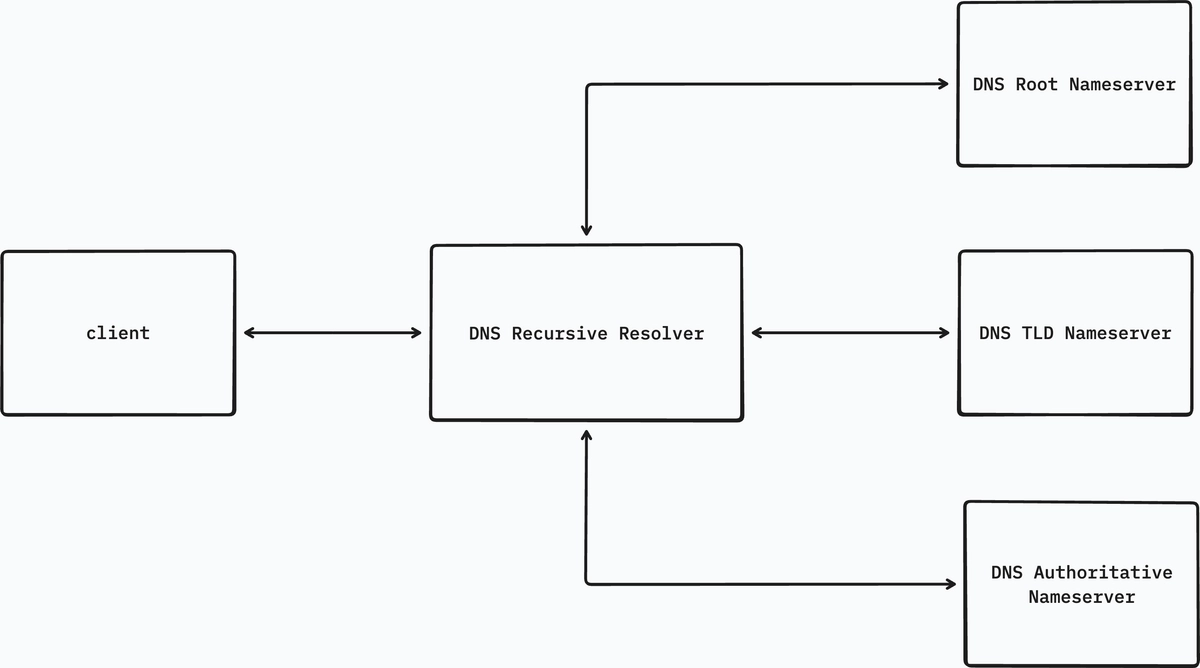
Now let's discuss how a domain actually gets resolved.
In our case, let’s take the example of destructure.in. What actually happens when you type destructure.in in your browser and press enter?
To resolve a domain, four main DNS servers are involved:
- DNS Recursive Resolver
- DNS Root Nameserver
- DNS TLD Nameserver
- DNS Authoritative Nameserver
Each of these servers solves the problem at a different level of the DNS hierarchy.
DNS Recursive Resolver
This is the server where the client sends the first request to resolve a domain. You can think of it as a middleman between the client and the DNS system.
When the request arrives, the resolver first checks its caching layer.
If the record already exists in the cache, the resolver immediately returns the IP address to the client. In this case, the DNS lookup ends here.
If the record is not found in the cache, the resolver starts the lookup process by sending a query to the Root Nameserver.
From this point onward, the resolver keeps querying different DNS servers step by step until it finally reaches the Authoritative Nameserver that contains the actual record.
If the record does not exist even at the authoritative server, then the domain may be invalid, misconfigured, or the requested record simply does not exist.
DNS Root Nameserver
There are 13 logical root nameservers, distributed across many locations around the world.
The root nameserver does not know the IP address of the domain. Instead, it knows where the next level of the DNS hierarchy is located.
When the resolver asks about destructure.in, the root server looks at the Top Level Domain (TLD) part of the domain.
In our case, the TLD is .in.
The root server then replies with the addresses of the .in TLD nameservers, telling the resolver where to ask next.
There are many TLDs such as:
.com.org.edu.net
and also country-specific TLDs like .in, .uk, .jp, etc.
DNS TLD Nameserver
The TLD nameserver receives the request from the resolver and checks which authoritative nameserver manages the domain.
In simple terms, it answers the question:
“Which server is responsible for the DNS records of this domain?”
It then returns the nameserver records for that domain, something like:
ns1.domain-provider.com
ns2.domain-provider.com
These are the Authoritative Nameservers responsible for the domain. The resolver then sends the next request to one of these servers.
DNS Authoritative Nameserver
When the request finally reaches the Authoritative Nameserver, this server contains the actual DNS records for the domain.
Here the server checks the requested name (@, www, or any subdomain) and looks at the record type.
For example:
- If the record type is
A, the server returns the IPv4 address. - If it is
AAAA, it returns the IPv6 address. - If it is
CNAME, it points to another domain name. If the record is aCNAME, the resolver must resolve that domain as well, which may trigger another DNS lookup.
Eventually the resolution ends when the resolver receives an A or AAAA record, which contains the final IP address.
The resolver then stores the result in its cache for the duration specified by the TTL, and finally returns the IP address back to the client.
A Small Analogy to Recursion
You can think of DNS resolution somewhat like recursive calls in programming.
The resolver keeps asking the next server in the hierarchy until it reaches the server that has the actual answer.
The resolution effectively ends when an IP address (A or AAAA) is returned. So is this the base case.
DNS Records: The Language of the Internet
Until now we have discussed how a DNS query travels through different servers to finally reach the Authoritative Nameserver. But the next question is:
What exactly does the Authoritative Nameserver return?
The answer is DNS Records.
DNS records are the actual pieces of information stored for a domain. They tell the internet how different services of a domain should behave. You can think of them as instructions that describe what to do with a domain name.
For example:
- where a website is hosted
- where emails for the domain should go
- which server handles a subdomain
- verification or configuration information
All of this is defined using different types of DNS records.
A Record
The A record is the most common DNS record.
It maps a domain name to an IPv4 address.
Example:
destructure.in → 192.0.2.10
So when a resolver asks for the A record of destructure.in, the authoritative server returns the IPv4 address of the server hosting the website.
This is usually the final step of DNS resolution, because the browser ultimately needs an IP address to connect to the server.
AAAA Record
The AAAA record works exactly like the A record, but instead of IPv4 it maps a domain to an IPv6 address.
Example:
destructure.in → 2001:db8::1
With the gradual adoption of IPv6, many domains now provide both A and AAAA records.
CNAME Record
A CNAME (Canonical Name) record is used to alias one domain to another domain.
Instead of pointing directly to an IP address, it points to another domain name.
Example:
www.destructure.in → destructure.in
When the resolver encounters a CNAME record, it needs to resolve the target domain again to find its IP address.
So the resolver performs another lookup until it eventually reaches an A or AAAA record.
MX Record
The MX (Mail Exchange) record specifies which servers handle email for a domain.
Example:
destructure.in → mail.destructure.in
This tells mail servers where to deliver emails sent to addresses like:
A domain can have multiple MX records, usually with different priorities.
NS Record
The NS (Nameserver) record defines which nameservers are authoritative for the domain.
Example:
destructure.in → ns1.domain-provider.com destructure.in → ns2.domain-provider.com
These records are what the TLD nameserver returns during DNS resolution, telling the resolver where to find the authoritative server.
TXT Record
The TXT record is used to store arbitrary text data associated with a domain.
It is commonly used for:
domain verification
email authentication (SPF, DKIM, DMARC)
service configuration
Example:
destructure.in → "v=spf1 include:_spf.google.com ~all"
Many services ask you to add a TXT record to prove that you own the domain.
Caching, TTL, and Why DNS Is Fast (and Sometimes Wrong)

DNS resolution involves multiple servers, root, TLD, and authoritative. If this full process happened for every single request, DNS would become extremely slow and put unnecessary load on the infrastructure.
To solve this, DNS heavily relies on caching.
When a resolver successfully resolves a domain, it stores the result in its cache. The next time someone asks for the same domain, the resolver can return the result directly from the cache, without repeating the whole lookup process.
This makes DNS very fast in practice.
But cached records cannot live forever. Each DNS record comes with a value called TTL (Time To Live).
TTL defines how long a DNS record should remain in cache before it expires.
Example:
destructure.in A 192.0.2.10 TTL: 3600
Here the record can be cached for 3600 seconds (1 hour). After the TTL expires, the resolver must query the authoritative server again to get a fresh record.
This is where things sometimes become confusing.
When you update a DNS record, some users may still receive the old IP address because their resolver still has the previous value cached. Until the TTL expires, that cached value will continue to be used.
This is why DNS changes sometimes appear to take time to propagate across the internet.
So caching makes DNS fast, but it also means DNS data can be temporarily outdated.

Control, Blocking, and DNS as a Power Layer
DNS is usually described as the phonebook of the internet, but in reality it is also a control layer.
Because every request to a domain first goes through DNS resolution, whoever controls the DNS resolver has the ability to control where users can connect.
For example, an ISP can configure its DNS servers to block certain domains. Instead of returning the real IP address, the resolver may return no result, or redirect the request to another page.
Many organizations use this technique for content filtering and security policies. In corporate networks, DNS is often used to block access to malicious or unwanted websites.
DNS can also be used for parental control systems, where specific categories of websites are restricted.
In some cases, DNS is used at a larger scale for censorship or regulatory blocking, where access to certain domains is intentionally restricted within a region.
Because of this, DNS is not just a lookup system, it also becomes a point of control over internet access.
This is why alternative DNS providers like Google DNS or Cloudflare DNS are sometimes used. They provide different policies and may bypass restrictions applied by local resolvers.
In simple terms:
If DNS decides where a domain points, controlling DNS means controlling where users can go on the internet.