TL;DR A deployment is the process of making a service continuously available to users over a network, either globally or within a specific territory.
In simpler terms, deployment is not just running code. It is about ensuring that your service is reachable, secure, reliable, and always running, even when things go wrong.
To understand deployment properly, let’s walk through what happens when a user hits your domain, step by step.
Request Lifecycle: From DNS to Application
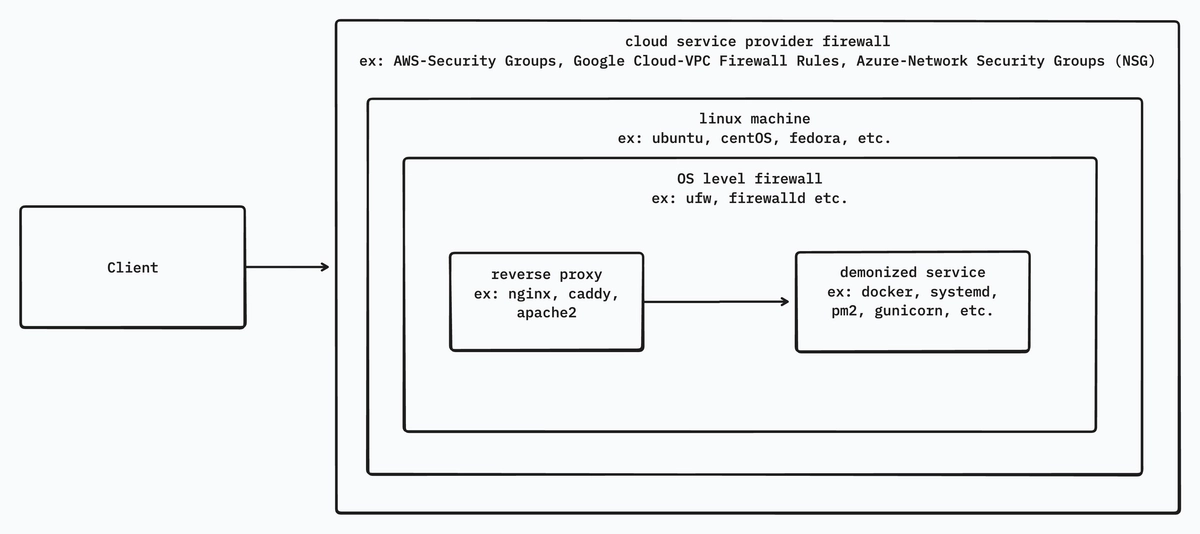
When a user types your domain into a browser, a lot happens before your application code executes.
Let’s break it down from first principles.
Cloud Service Provider Firewall

When a user hits your domain, DNS resolves it to a public IP address.
The client then sends a request to that IP on a specific port (for example, 443 for HTTPS, 80 for HTTP).
Before the request reaches your server, it first encounters the cloud provider’s firewall (AWS Security Groups, GCP VPC Firewall, Azure Network Security Groups, etc.).
This firewall checks:
- Source IP address or CIDR range
- Destination port
- Protocol (TCP / UDP / ICMP)
If the request violates any rule, it is dropped immediately. If not allowed, it is forwarded to your VPS (Virtual Private Server).
Another important advantage of cloud firewalls is centralized configuration. Instead of configuring firewall rules separately on every server, you can define a single firewall policy and apply it across multiple VPS instances or services. This ensures consistent security rules, reduces configuration drift, and simplifies infrastructure management at scale.
Important note: Cloud firewalls operate at the network and transport layers. They do not understand HTTP headers, domains, or request bodies.
OS-Level Firewall
Once the request enters the VPS, it reaches the operating system firewall (iptables, nftables, ufw, firewalld).
Here you can:
- Allow or block specific ports
- Restrict traffic from certain IPs
- Add basic rate limits
Even if the cloud firewall allows traffic, a misconfigured OS firewall can still block it.
If allowed, the request continues toward the next layer.
Reverse Proxy
Assume:
- Public IP:
1.1.1.1 - Client requests:
1.1.1.1:9090
If nothing is listening on port 9090, the client receives:
This site can’t be reached
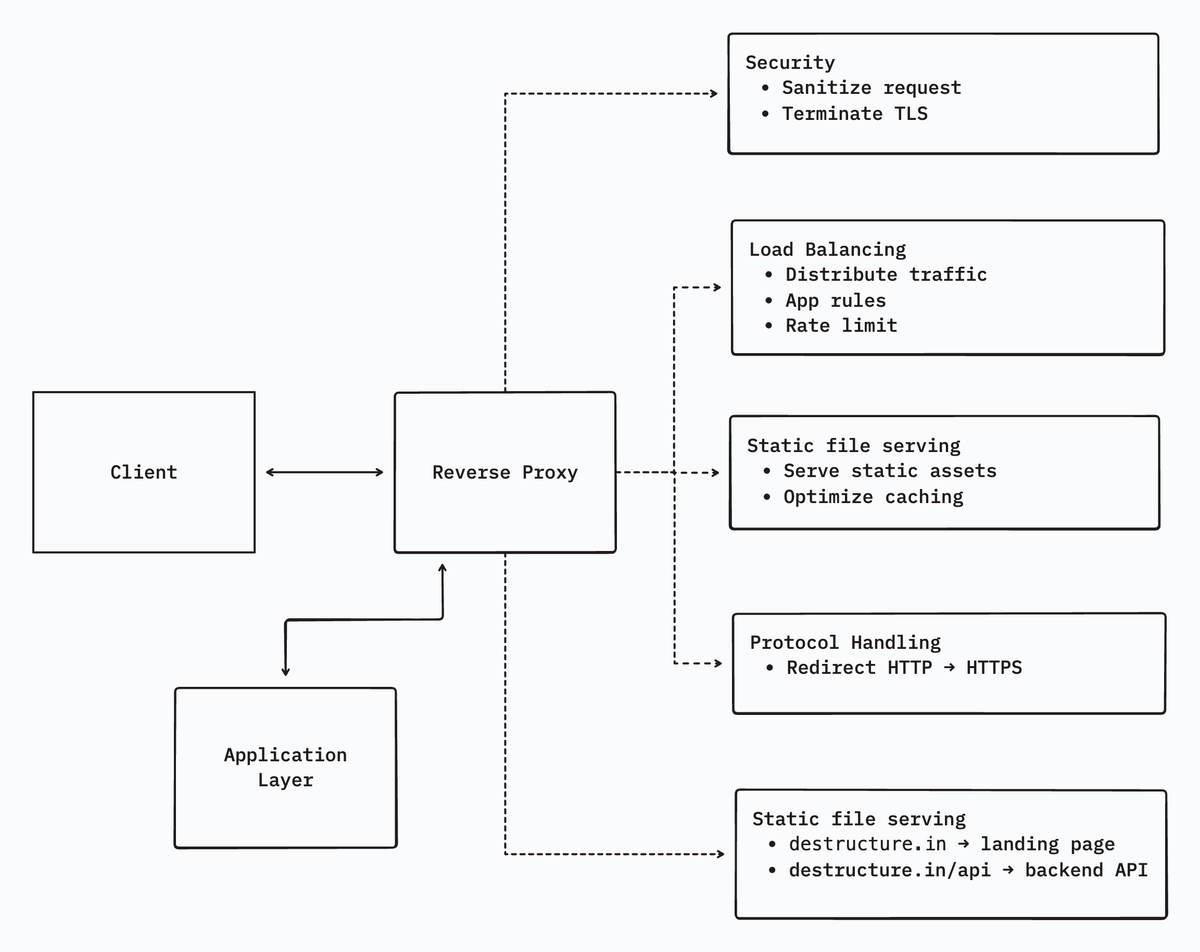
This is where the reverse proxy comes in.
If a reverse proxy (Nginx, HAProxy, Apache2, Caddy) is configured to listen on 9090, it can forward the request internally, for example to localhost:3000, where your application is running.
Is a reverse proxy just port forwarding?
Absolutely not. Port forwarding is the smallest and least important feature of a reverse proxy.
What a reverse proxy actually does
1. Security boundary - Your application should never be directly exposed to the internet.
A reverse proxy:
- Keeps internal ports private
- Limits request body size
- Sanitizes headers
- Terminates TLS (HTTPS)
- Can integrate Web Application Firewalls (WAF)
2. Load balancing and rate limiting - It can:
- Distribute traffic across multiple backend services
- Rate-limit abusive IPs
- Apply different rules per route
3. Static file serving - Serving static assets through a reverse proxy is:
- Faster
- More memory-efficient
- Easier to cache
4. Protocol and scheme handling -
- Redirect HTTP → HTTPS
- Handle HTTP/1.1, HTTP/2, gRPC
- Offload protocol complexity from the app
5. Routing -
destructure.in→ landing pagedestructure.in/api→ backend APIdestructure.in/admin→ internal service
Mental model: A reverse proxy is a traffic manager + security gate + SSL handler.
Application Layer

This is the layer users actually care about, the service itself.
Assume a Node.js application running on port 3000.
If everything above is configured correctly, the reverse proxy forwards traffic to localhost:3000.
If the application is not running, users receive:
502 – Bad Gateway
Why “node app.js” is not deployment
If you run:
node app.jsIt works, until:
- You close the terminal
- The SSH session disconnects
- The server reboots
- The process crashes
At that point, your service is down.
Running:
node app.js &only detaches the process from the terminal. It still has:
- No crash recovery
- No restart on reboot
- No logs
- No monitoring
This is not production-grade deployment.
Daemonization: a hard requirement
A deployed service must:
- Survive terminal logout
- Restart automatically on crash
- Restart after system reboot
- Provide logs
- Expose health status
To achieve this, we use process managers or containers.
Common approaches:
- PM2 – process lifecycle management, clustering
- systemd – OS-level service management
- Docker – process + filesystem isolation
- Gunicorn - For python applications.
Daemonization is what turns a demo into a proper deployment.